Start

Newsletters and campaigns
Email campaigns without the chaos.
Build newsletters from blocks, keep your contact list clean, and send campaigns at a safe pace to people who actually want to receive them.
Block editorCSV contact importVerified recipients only
FinchSend is used by AlePachniesz.pl, an online store powered by Shoper.
Campaign platform
Grow calmly from the first newsletter to regular sending.
Prepare your message, choose recipients, and follow sending progress in one place.
Order
Contacts with clear statuses
Upload your list and see who can receive messages, who is awaiting confirmation, and who has unsubscribed.Control
Know what has been sent
Follow campaign progress and see which messages have been sent and which need your attention.Modules
From newsletter signup to your next campaign.
Collect signups, create messages, and review results. Manage every step from one dashboard.
Email campaigns
Prepare a newsletter or promotion, send a test, and schedule delivery to your list.
Message editor
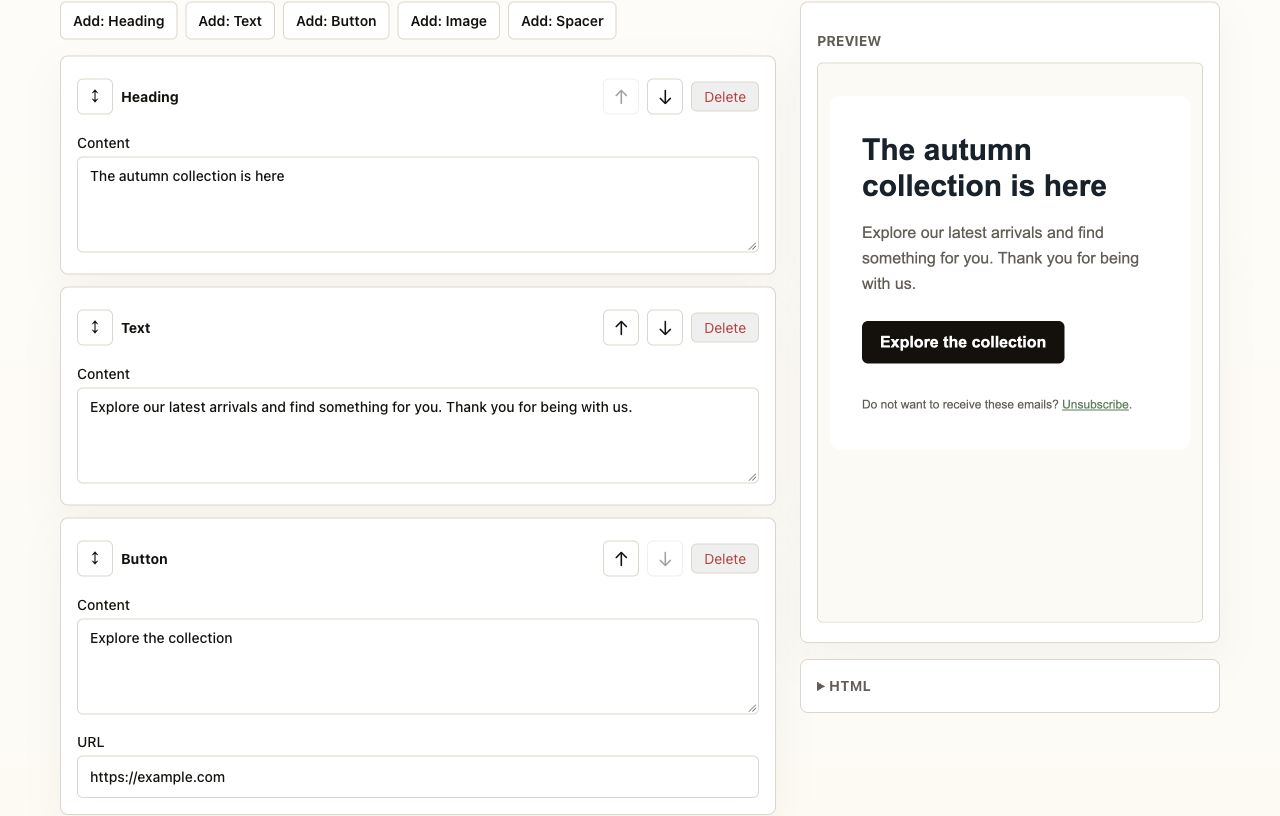
Arrange text, images, and buttons with drag and drop. Preview your email before sending.
Contact list
Add recipients manually or upload a CSV file. Imports detect duplicates and invalid addresses.
Signup forms
Add a form to your page or a popup. New subscribers confirm their signup through an email link.
Campaign reports
Review deliveries, opens, clicks, bounces and unsubscribes. Data depends on the provider’s tracking configuration.
Easy unsubscribe
Recipients follow a link and confirm without logging in. FinchSend skips them in future sends.
Your domain. Confirmed subscribers. Controlled sending.
Deliverability starts before your first campaign. FinchSend combines sender authentication with recipient checks.
Your domain, SPF and DKIM
Add a domain in the dashboard, prove ownership and copy the required DNS records. Campaign sending requires a verified sender domain.
DMARC under your control
Set your DMARC policy in your domain’s DNS. It helps protect your brand against spoofing; the dashboard verifies the domain but does not manage DMARC policy.
Double opt-in and unsubscribe
Form signups require email confirmation. Unsubscribed contacts are skipped even when a campaign is already queued.
Resend infrastructure
FinchSend passes messages through the Resend API, which handles delivery. You do not need to connect your own SMTP server. Campaigns are processed in batches of up to 20 messages.
Inbox placement also depends on domain reputation, content and list quality. Authentication does not guarantee a particular deliverability rate.
Domain setupCollect signups where your customers are.
Embed forms and popups on your website. Native store list synchronization has its own scope and availability status.
WordPress
A plugin for embedding FinchSend forms and popups. Signups go directly to your list and complete double opt-in.
Installation guideShoper
A specification is ready for confirmed subscriber and unsubscribe synchronization. You can already embed a FinchSend form by script where your store template supports it.
Discuss integrationWooCommerce
Forms work through the WordPress plugin. Checkout newsletter and WooCommerce list synchronization is planned; installing the plugin does not enable it.
Discuss integrationWhat you can do today, and what comes next.
Explore available features after creating an account. Release dates for planned features have not been confirmed.
Available now
- Embedded forms and popups with double opt-in
- Block editor, previews and test sending
- Campaign scheduling and sending queue
- Delivery, open, click, bounce and unsubscribe reports
Planned
- Shoper and WooCommerce subscriber synchronization
- Automations, including marketing welcome emails
- Subject and content A/B tests
- Full contact list CSV export
Open and click data requires Resend tracking and a configured webhook. Mailbox privacy features and link scanners can affect results.
Built for
The same flow works for a small list and a growing database.
Small business
Your first newsletter, step by step
- Editor with no coding required
- Contact import from a file
- Preview and test sending
Ecommerce
Show customers new arrivals and offers
- Product images and store links
- Newsletter signup forms
- Scheduled sending
Growing businesses
Keep a larger contact list organized
- Plans up to 50,000 contacts
- Recipient statuses in one place
- A report for every campaign
FinchSend customer
AlePachniesz.pl
FinchSend is used by AlePachniesz.pl, an online store powered by Shoper.
Visit the storeExample store campaign workflow
- Import confirmed subscribers from CSV
- Build a newsletter with new arrivals and product links
- Send a test, launch the campaign and review the report
This example illustrates how the product can be used. Campaign results and a customer testimonial will be published once confirmed.
Pricing
Plans for active recipients.
Choose a plan for your list size and the number of messages you send each month. All plans include the same tools. Save approximately 15% with annual billing.
Free account, paid sending
Use the editor, preview, and contact import without a card. Test messages and campaigns require an active paid plan. We do not offer a free sending trial.
up to 1,000 recipients
Start
Your first newsletter and communication with a small customer list.
1,000contacts10,000emails / mo.
49 PLN/ mo.
42 PLN / mo. with annual billing
- Message editor
- Contact import from a file
- Test sending
- Signup forms
- Campaign reports
up to 5,000 recipients
Growth
Regular newsletters and promotions for a growing recipient list.
5,000contacts60,000emails / mo.
149 PLN/ mo.
127 PLN / mo. with annual billing
- Message editor
- Contact import from a file
- Test sending
- Signup forms
- Campaign reports
Recommendedup to 15,000 recipients
Ecommerce
New arrivals and seasonal offers for a store with a larger subscriber list.
15,000contacts180,000emails / mo.
349 PLN/ mo.
297 PLN / mo. with annual billing
- Message editor
- Contact import from a file
- Test sending
- Signup forms
- Campaign reports
up to 50,000 recipients
Scale
Frequent campaigns for a large customer and subscriber list.
50,000contacts600,000emails / mo.
899 PLN/ mo.
764 PLN / mo. with annual billing
- Message editor
- Contact import from a file
- Test sending
- Signup forms
- Campaign reports
Limits are currently shown in the dashboard without automatic blocking or overage charges. Opens and clicks require Resend tracking configuration. Confirm VAT arrangements before purchasing; see the FAQ for details. FAQ →
| Active recipients | Plan | Monthly | Annual |
|---|---|---|---|
| up to 1,000 | Start | 49 PLN | 42 PLN / mo. |
| 1,001-5,000 | Growth | 149 PLN | 127 PLN / mo. |
| 5,001-15,000 | Ecommerce | 349 PLN | 297 PLN / mo. |
| 15,001-50,000 | Scale | 899 PLN | 764 PLN / mo. |
Payments
Choose how you pay.
How to start
Prepare a campaign, then choose a plan.
- 1Create a free account and confirm your email address.
- 2Add contacts and prepare a message in the editor.
- 3Choose a paid plan and pay monthly or annually.
- 4Send a test message, then send your campaign.
Compare the scope before choosing.
FinchSend focuses on campaigns, signups and clear list management. If you need advanced automations today, include their availability in your decision.
| Platform | Price / month | Polish support | Automations / A/B |
|---|---|---|---|
| FinchSend · Start | 49 PLN | Polish dashboard and email contact | Planned |
| MailerLite · Comfort | ≈ 74.35 PLN (19 USD) | MailerLite Poland offering | Available; scope depends on plan |
| GetResponse · Starter | from 59 PLN excl. tax¹ | Polish help center | 1 automation workflow; check A/B scope |
| FreshMail → MailerLite Poland | Current MailerLite offering | Polish resources and support | Based on MailerLite plan |
Reviewed October 8, 2026. The indicative MailerLite PLN amount uses that day’s NBP average rate: 1 USD = 3.9132 PLN. It is not a billing price; taxes, exchange rates and bank fees can change the cost. FreshMail now operates as MailerLite Poland.
¹ Amount from GetResponse’s Polish help center. Confirm it in the current pricing page and checkout before purchase, as offers and currencies may differ.
Sources:MailerLite price for 1,000 contactsMailerLite PolandNBP rate, October 8, 2026GetResponse plans
Questions before your first campaign.
How do I cancel my subscription?
Email us from the address associated with your account. We will confirm cancellation of renewal and the end date of your paid period. If cancellation is available in your Stripe portal, you can use it yourself. Deleting contacts or stopping campaigns does not cancel a subscription.
Can I change my plan?
Yes. Choose a new plan and billing interval in Billing. For an existing subscription, the Stripe portal shows the change conditions and any additional amount before you confirm.
What happens if I exceed a limit?
The dashboard displays contact and sending usage. The current version does not automatically block campaigns at numerical plan limits or charge automatic overage fees. Before a larger send, choose an appropriate plan or discuss Enterprise scope with us.
Will I receive a VAT invoice?
Stripe handles payments and billing documents. Before purchasing, contact us to confirm VAT invoice availability, provide your business details and tax ID, and establish whether the price includes VAT. A payment confirmation alone is not a VAT invoice.
Can I import and export my contacts?
CSV import is available: it normalizes addresses, detects duplicates and reports invalid rows. Only import people who agreed to receive your messages. Full contact list export from the dashboard is planned; recipient statistics can currently be downloaded as CSV. Contact us about returning your contact list data.
Can I send from my own domain?
Yes. Add your domain in Domains and check the SPF and DKIM records required by Resend. A campaign’s sender address must belong to a verified domain. Configure DMARC separately with your DNS provider.
Where is data stored?
The application and database use Render hosting. Resend processes data needed for email delivery and Stripe handles payment data. The application and primary database are in Oregon (USA). Data is not processed exclusively in the EU; full transfer arrangements are still being reviewed. Consult the legal documents or contact the operator for details.
How does newsletter unsubscribe work?
Each campaign includes a personal unsubscribe link. Recipients confirm without logging in and the contact is marked unsubscribed. FinchSend also checks that status immediately before sending a queued message.
Do Shoper and WooCommerce synchronize contacts?
Native store list synchronization is planned. You can already embed FinchSend forms or popups, with a ready WordPress plugin for WordPress sites. These signups complete double opt-in. The integration does not automatically import all shoppers.
Can I see opens and clicks?
Yes. Campaign reports support delivery, open, click, bounce, complaint and unsubscribe events. Open and click data appears after enabling tracking in Resend and configuring its webhook. These are indicative metrics: privacy protection and link scanning can affect the results.
Get started
Prepare your first newsletter.
Create a free account without a card, add contacts, and explore the editor. Test messages and campaigns require an active paid plan.